
I’ve recently migrated away from iOS to GrapheneOS and I need a way to have a family shared calendar and reminders. I’m thinking NextCloud because I don’t really know of anything else.
I’ve been doing some research and I’m a bit overwhelmed since I have never self hosted before and I’m not too familiar with these technologies. I have an old HP ProDesk with an old i3, 4GB of RAM, and 120 GB SSD that I was hoping to use intermittently until I get a newer machine. I want to be able to expose the instance to the wider internet so we (my partner and I) can access it on the go, but I’m worried about messing it up. I was reading that I need a reverse proxy as bare minimum, but do I also need fail2ban, Anubis (or Go Away), and special UFW rules? I got as far as installing NextCloud with podman on Ubuntu Server 26.04.01 LTS and I can access it locally, but I’m not sure how to get move forward.
Ideally I would like to have a bash script that sets everything up with user data being handled by an external drive so I can easily reproduce it to a new machine later down the line and facilitate backups. I’m not married to Ubuntu and I am open to using something else.
I also want to run other self hosted open source services like Navidrome, Yamtrack, Standard Notes, etc. Any guidance would be appreciated.
Because you don’t have a lot of experience with this type of stuff, I would not recommend exposing all your applications to the open web unless you also are willing to install and maintain some sort of security dashboard or traffic analyzer with alerts in case someone is trying to do something malicious to your services. You can always tunnel in with a VPN at the flip of a switch. This would only expose the VPN to the open web, which is a much smaller attack surface than all your services. You could also use something like Tailscale to keep all the devices connected but not exposed to the open web.
I would recommend going this route as a beginner hobbyist just so you don’t have to be worried about the security of your server as much. Hope that helps!
Nextcloud is fine without Anubis since everything is behind a login.
Yes, you need a reverse proxy. Also you need a public IP which not all ISPs offer. If you have one, you have to forward port 443 to the reverse proxy in your router config. That means someone who tries to connect to your router on port 443 will be forwarded to the reserve proxy who checks which domain was looked for and forwards to the actual Nextcloud.
You’ll need a domain pointing to your public IP. That IP may change, so you need an automation that updates the DNS records (known as dyndns). When you’re selecting a registrar, look for one that has dyndns support (you can use different nameservers but that’s unnecessary extra steps).
Could you help me learn something conceptually about a reverse proxy?
My understanding is that Virtual Private Servers (vps) charge for bandwidth after you exceed a free cap.
If I set up nextcloud behind a reverse proxy, so that I’m not exposing my residential IP address to the internet, does that mean that when I upload a 500 gigabyte file, let’s say, I will incur 500 gigabytes of usage on the virtual private server?
Or is there some system where once you log in to your server, it is smart enough to make a direct connection from the client to the residential IP and bypass the reverse proxy?
Depending on how you set it up.
Normally, you run the reverse proxy on the same machine as your NextCloud.
The job of the reverse proxy is do TLS termination, ie. encrypt your communications. It can also do other things - like virtual hosts (self-host your NextCloud and … er, whatever else like Standard Notes on the same machine, distinguish them by FQDN: https://cloud.sem.com/ vs https://notes.sem.com/).On the topic of transferring 500GB files to your self-hosted storage - it really depends on where you connect from. Home WiFi? It’ll take the direct path, and likely be faster. Home, but on the mobile network? You’ll make a hop through the nearest cell tower, inflating your internet usage. A VPS, however, is not in this picture at all.
Now, could you add a VPS? Sure, but you’d need to have a specific reason/goal in mind. Your residential IP address is already exposed to the internet (evidently, as you’re posting here). Instead of a VPS-as-a-reverse-proxy, set up a Wireguard split tunnel with https://github.com/wgtunnel/android if you want your whole deployment be hidden/private.
The security aspect I’ve heard is that knowing your IP is one thing, but the more services you have running on your IP the more security holes there are likely to be. That was the idea for having public dns point to a VPS for nextcloud, so it is still reachable by the public, but not exposing the home network to any holes nextcloud may have.
But I’m not sure that is a great solutiin either.
Nextcloud probably has security holes :) but then use Wireguard to hide it from the interwebs. TLS termination should still be done in localhost.
In your example it would use that much and no it can’t be shortcut, that’d be a big security bug and is not intended.
The reverse proxy is just a piece of software and can be on the same machine as the actual service, but yeah, if you don’t have a public IP at home, you’ll need someone like you described and it will need the traffic.
I think there’s different software that does hole punching and actually gets you a peer to peer connection but there’s more vpn territory where the vps is just used to find a way between the peers.
For most use cases, the free traffic is usually enough though.
Thanks for the detailed explanation, that helps a lot
Are there any good guides that you would recommend to a beginner on how to properly set it up?
Check out Nginx Proxy Manager. it automates the process of setting up a reverse proxy server for you. You will need your own domain name to make it work.
Most likely yes, but I don’t know any I can recommend, sorry
Easiest way i have done this is through yunohost.
Ive done it bare metal before and it sucks after a year doing updates.
When I was a newbie, my first project was also Nextcloud. Honestly, Nextcloud is overkill if all you need is to host a calendar. You can probably find something that meets your needs (like Radicale ) at Awesome Self Hosted.
If you are getting started in self hosting, you should spend a little time learning Docker . It’s a tool for hosting software in individual containers on your local computer. You will find that many self-hosted apps have installations for Docker container versions in their documentation.
For me, once I understood docker, and also Portainer , a web UI for Docker, I got over the learning curve and was able to install most Foss apps I found online. Good luck!
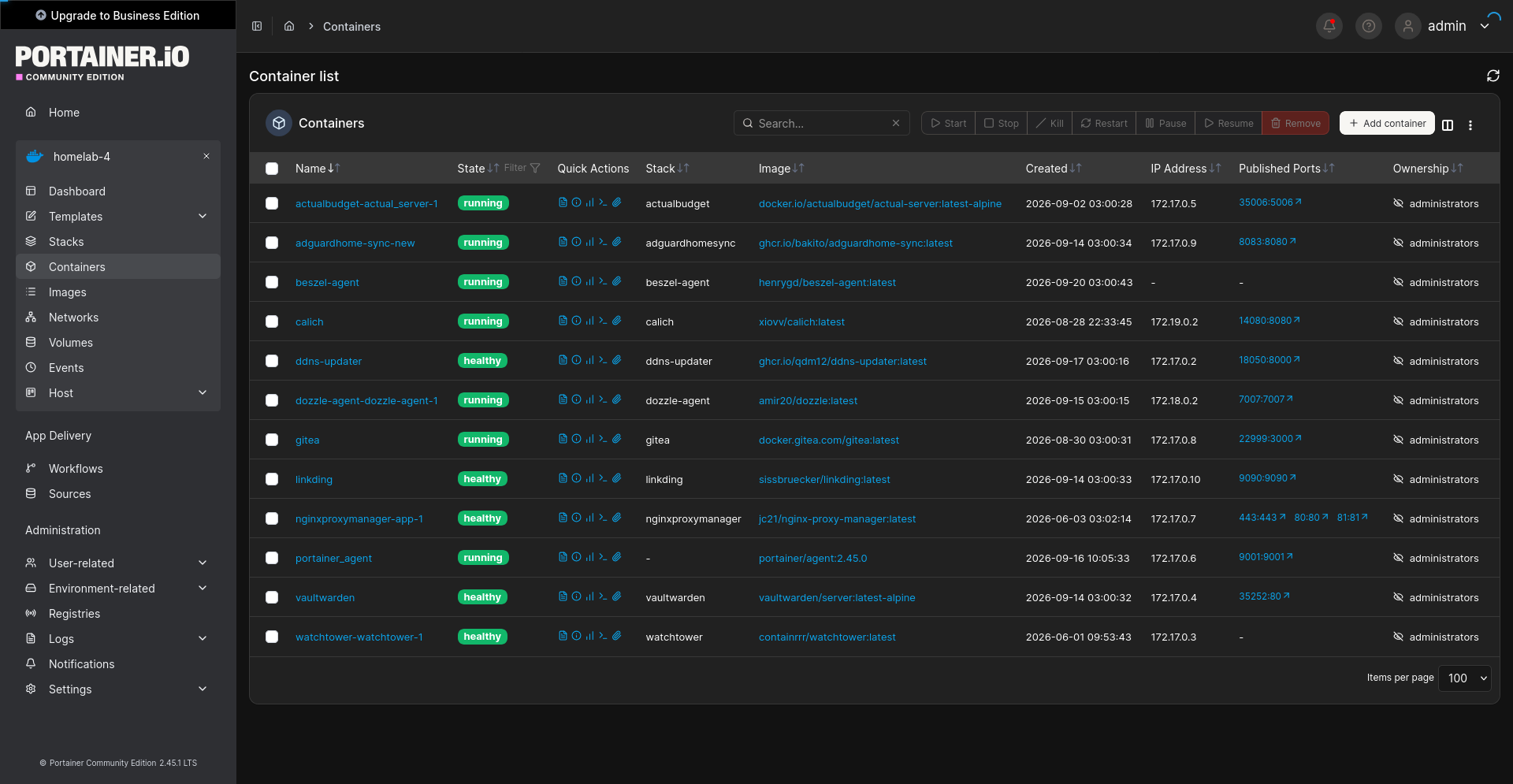
Screenshot of Portainer, showing a list of Docker containers running various Foss apps
Didn’t know about Awesome Self Hosted, I’ve just bookmarked it, will definitely be checking that out. There are other features I need from NextCloud, the calendar was just one example.
Not a fan of docker because it is not completely open source, so I’ve been using podman instead. Portainer looks cool and is something I would like to use, however I’m worried that it’ll end up going the way of enshitification since it’s run by a for profit company for the sole purpose of profit. Also not a fan of their license.
If you don’t want to use Portainer, there is alternative called DockGe. I tried it, and eventually came back to Portainer. But I know a lot of people really like it. It should work with Podman too.
Also check out Dockhand for a Docker UI.
The main thing is to set up a Linux server and connect it to the internet. I do it without a fixed IP, just a dynamic DNS domain.
Nextclod will tell you it’s specific requirements then (e.g. php, database) and it has the specific instructions too.
